20 Leaves Procreate Stamps: A Practical Guide for Digital Artists and Tattoo Designers
Digital illustration has evolved rapidly, shifting from complex manual rendering to efficient, asset-based workflows. For artists working within the iPad ecosystem, 20 Leaves Procreate Stamps represent a specialized tool designed to streamline the creation of botanical elements. Whether you are designing intricate leaf tattoos, crafting floral patterns, or adding organic textures to landscape illustrations, this brush set offers a focused solution. However, like any digital asset, it is essential to understand what this product actually delivers, how it integrates into your workflow, and whether it aligns with your specific artistic needs before downloading.
Understanding the Format: Stamps vs. Traditional Brushes
To evaluate the utility of 20 Leaves Procreate Stamps, one must first distinguish between standard brushes and stamp brushes. Traditional brushes in Procreate rely on continuous stroke dynamics, where pressure, tilt, and speed determine the output. Stamp brushes, conversely, function more like pre-designed assets or "stickers" that can be placed onto the canvas with a single tap.
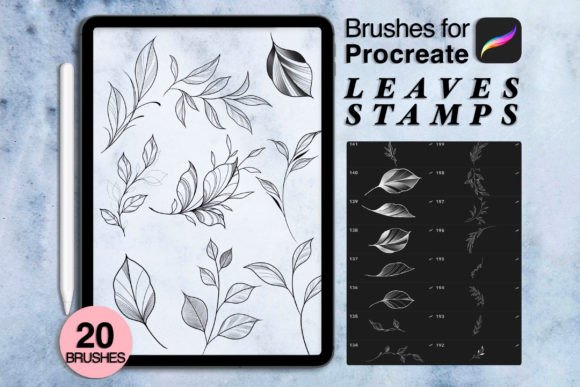
This distinction is crucial for users considering this download. The included ZIP file contains .brushes or .swatches specifically formatted for immediate use. This means you are not getting a tool that paints a leaf as you drag your pencil; you are getting twenty distinct, high-quality leaf shapes that can be stamped, rotated, resized, and layered. This approach is particularly beneficial for:
- Tattoo Artists: Who need consistent, clean linework and shading elements that can be quickly arranged into a sleeve or patch design.
- Pattern Designers: Who require repetitive botanical elements for textiles or wallpaper without drawing each leaf individually.
- Illustrators: Who want to add quick foliage to background scenes without spending hours on detailed botanical studies.
The tradeoff here is control versus speed. While you lose the organic variability of hand-drawing every vein, you gain significant time efficiency and uniformity. For professionals billing by the hour, this efficiency can be a decisive factor.
Evaluating the Content: Botanical Versatility and Style
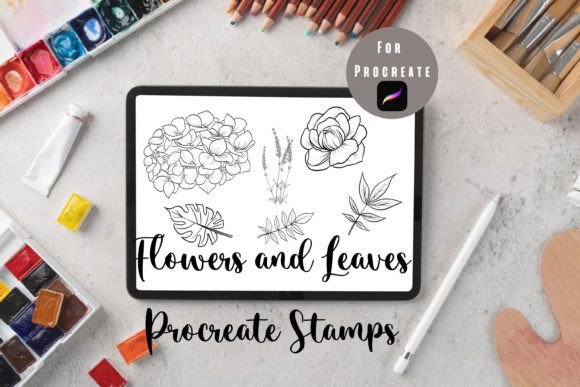
The core value of this set lies in its curation. With twenty unique stamps, the collection covers a range of botanical styles, including general leaf shapes, fall-themed foliage, and delicate floral accents. The designs are versatile enough to be used in various contexts, from realistic nature journals to stylized graphic designs.
When comparing this set to larger, generic brush packs that may contain hundreds of low-quality items, 20 Leaves Procreate Stamps focuses on quality over quantity. Each stamp is designed to be distinct, reducing the need to sift through dozens of similar options to find the right shape. The inclusion of both broad leaves and finer, fern-like structures allows for depth and variety in compositions.
However, users should note that these are static shapes. While they can be manipulated using Procreate’s transform tools—such as warping, liquifying, or adjusting hue and saturation—they do not inherently change shape based on pressure sensitivity during the stamping process. This requires the artist to have a good understanding of composition and layering to avoid a "copy-paste" aesthetic. Successful use involves rotating each stamp slightly, varying opacity, and combining different sizes to create natural-looking clusters.
Technical Requirements and Compatibility
Before purchasing, it is vital to ensure your hardware and software meet the necessary specifications. This is a digital-only product; NO physical object will be shipped. The download is instant, providing immediate access to the files after purchase. This convenience eliminates waiting times but requires users to be comfortable with file management on their devices.
The technical prerequisites are specific:
- Hardware: An iPad Pro or any iPad model compatible with the latest versions of Procreate. An Apple Pencil or a third-party stylus that supports pressure sensitivity is recommended for overall workflow, though stamping itself requires less precision than drawing.
- Software: Procreate Version 5.0 or higher. Older versions may not support the latest brush engine features or file formats used in this set.
If you are using an older iPad model or an outdated version of Procreate, you may encounter compatibility issues. It is advisable to update your app and operating system before attempting to import the .brushes or .swatches files. The installation process is straightforward: typically, you download the ZIP file, unzip it, and tap on the individual brush files to open them directly in Procreate.
Comparing Alternatives: When Is This Set the Right Choice?
In the broader market of digital art resources, artists have several options for creating botanical elements. Understanding where 20 Leaves Procreate Stamps fits in this landscape helps in making an informed decision.
Option 1: Hand-Drawing Every Element
Purists may prefer drawing every leaf from scratch. This method offers maximum creative control and uniqueness. However, it is time-consuming and requires advanced anatomical knowledge of plants. This stamp set is ideal for artists who have the skill but lack the time, or who need to produce commercial work under tight deadlines.
Option 2: Large Generic Brush Bundles
Many online marketplaces offer massive bundles containing thousands of brushes. While these seem like better value, they often suffer from inconsistency in style and quality. You may spend hours testing brushes only to find that few are usable. The curated nature of this twenty-stamp set ensures that every item is relevant to botanical themes, reducing decision fatigue.
Option 3: Vector-Based Tools (e.g., Adobe Illustrator)
For print design, vector tools offer infinite scalability. However, Procreate remains superior for textured, hand-crafted aesthetics. If your goal is to create digital art that retains a human touch—such as tattoo flash sheets or illustrated greeting cards—Procreate stamps provide a balance between digital precision and organic feel that vectors often lack.
Practical Use Cases and Limitations
To maximize the value of 20 Leaves Procreate Stamps, consider integrating them into specific workflows. For tattoo designers, these stamps can serve as a base layer. You can stamp a leaf arrangement, lower the opacity, and then trace over it with custom linework to add personal flair. This hybrid approach maintains efficiency while ensuring the final design is unique to your style.
For illustrators, these stamps are excellent for filling negative space. Instead of leaving a background blank, a few strategically placed leaf stamps can add depth and context without distracting from the main subject. Experimenting with blend modes, such as Multiply or Overlay, can help integrate the stamps seamlessly into painted backgrounds.
It is important to acknowledge the limitations. Since these are pre-made shapes, overuse can lead to repetitive patterns. To mitigate this, always modify the stamps after placement. Use the Liquify tool to bend stems, adjust color balance to match your palette, and erase parts of the stamp to create irregular edges. This post-processing step is what separates amateur usage from professional application.
Making the Decision
Ultimately, the decision to download 20 Leaves Procreate Stamps depends on your current workflow and project requirements. If you frequently incorporate botanical elements into your art, this set offers a cost-effective and time-saving solution. The instant download format means you can start experimenting immediately, with no shipping delays or physical storage concerns.
However, if you prefer complete manual control over every stroke or if you work primarily in vector-based environments, this tool may not be essential. For those who value efficiency, consistency, and a curated selection of high-quality botanical assets, this brush set provides a practical addition to your digital toolkit. By understanding its strengths and integrating it thoughtfully into your creative process, you can enhance your productivity without compromising on artistic integrity.