Enhancing Digital Planning with Washi Tape Procreate Stamps
In the rapidly evolving landscape of digital creativity, the tools we use define not just the quality of our output, but the joy we derive from the process. For iPad users who have embraced Procreate as their primary canvas, the search for efficiency and aesthetic appeal often leads to specialized assets. Among these, Washi Tape Procreate Stamps have emerged as a subtle yet transformative resource for digital planners, journalers, and designers. This article explores the utility, application, and value of this specific set of 15 stamp brushes, offering a clear perspective on how they integrate into a modern digital workflow.
The Intersection of Tradition and Technology
Washi tape, traditionally a decorative paper tape made from natural fibers like hemp, bamboo, or rice, has long been a staple in physical scrapbooking and bullet journaling. Its charm lies in its texture, translucency, and ease of use. However, transitioning to a fully digital environment presents a challenge: how to replicate that tactile, organic feel without the physical materials. This is where Washi Tape Procreate Stamps bridge the gap. They are not merely images; they are functional brush tools designed specifically for the Procreate app on the iPad.
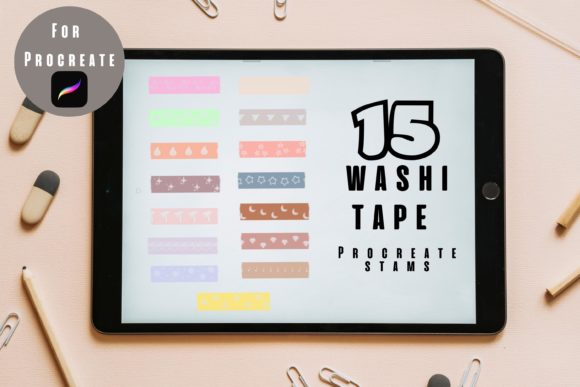
Unlike standard image imports, which can be cumbersome to resize and rotate repeatedly, stamp brushes offer instant placement. The set in question includes 15 washi tape stamps ONLY FOR PROCREATE, meaning they are optimized for the software’s engine. This optimization ensures that when you tap the screen, the result is immediate, responsive, and perfectly integrated with your layer structure. For those who miss the ritual of tearing off a piece of tape and sticking it down, these digital equivalents provide a satisfyingly similar experience, minus the waste and cost.
Key Features and Functional Benefits
Understanding the technical characteristics of these brushes helps in maximizing their potential. The core value proposition of this set lies in its simplicity and flexibility. Here are the primary features that distinguish these stamps from generic clipart:
- Native Procreate Integration: These are .brushset files, ensuring seamless installation and performance within the app.
- Customizable Colors: One of the most significant advantages over physical tape is the ability to change colors instantly. Using Procreate’s color adjustment tools, users can match their washi tape to any palette, allowing for cohesive design themes.
- Scalability: As vector-like raster stamps, they maintain clarity at various sizes. You can use them as subtle borders or bold statement pieces without losing definition.
- Non-Destructive Editing: Since each stamp creates a new stroke on its own layer (or can be easily isolated), adjustments to opacity, blend modes, and position are effortless.
The fact that this set includes 15 distinct designs provides enough variety to prevent visual monotony while remaining curated enough to ensure stylistic consistency. Whether you prefer minimalist stripes, floral patterns, or textured solids, there is likely a stamp that fits your aesthetic.
Practical Applications for Creators and Professionals
While the term "digital planning" is often associated with hobbyists, the utility of Washi Tape Procreate Stamps extends far beyond personal journals. Professionals across various fields can leverage these tools to enhance communication, organization, and presentation.
- Digital Planners and Productivity Systems: For individuals using apps like GoodNotes or Notability alongside Procreate, these stamps serve as visual anchors. They can highlight priority tasks, section off weekly reviews, or decorate habit trackers. The visual cue of a "tape" strip helps the brain categorize information quickly.
- Social Media Content Creation: Influencers and small business owners often create graphics for Instagram stories or Pinterest pins. Adding a digital washi tape element can frame product photos, underline key quotes, or add a handcrafted touch to promotional materials, making them stand out in a saturated feed.
- Educational Materials: Teachers creating digital worksheets or interactive lessons can use these stamps to create engaging headers, separate sections, or add decorative elements that make learning materials more inviting for students.
- Client Presentations: Freelancers and consultants can use these stamps to annotate screenshots or mockups. A digital tape strip can effectively draw attention to specific UI elements or design choices during client reviews, adding a professional yet approachable tone.
Who Benefits Most from This Tool?
The ideal user for Washi Tape Procreate Stamps is someone who values both aesthetics and efficiency. If you are a digital artist who spends hours manually drawing decorative borders, these stamps can save you significant time. If you are a planner who feels your digital layouts look too sterile or rigid, these stamps introduce organic warmth. Business owners who handle their own marketing will find them invaluable for quick graphic enhancements without needing advanced Photoshop skills.
However, it is important to note that these are ONLY FOR PROCREATE. Users of other digital art software such as Adobe Fresco, Clip Studio Paint, or Affinity Designer will not be able to utilize this specific file format. This limitation is crucial for buyers to understand before purchase. The value is high, but only if you are already embedded in the Apple and Procreate ecosystem.
Evaluating Suitability and Limitations
No tool is perfect for every scenario. When considering whether to integrate Washi Tape Procreate Stamps into your workflow, it is helpful to weigh the strengths against potential limitations.
Strengths: The primary strength is speed. What might take five minutes to source, import, resize, and rotate as a PNG image takes two seconds with a stamp brush. The ability to change colors on the fly also eliminates the need for multiple versions of the same asset. Furthermore, because they are brushes, they inherit the pressure sensitivity settings of Procreate, although for stamps, this is less critical than for drawing brushes.
Considerations: Since these are raster-based stamps, extreme upscaling beyond their original resolution may result in pixelation. While Procreate handles high-resolution canvases well, users should be mindful of their canvas size. Additionally, because there are only 15 designs, users seeking hundreds of unique patterns may find the set limited. It is best viewed as a foundational toolkit rather than an exhaustive library.
Practical Expectations: These stamps are designed for decoration and organization, not for complex photo manipulation. They work best when used as overlays or accents. Expect them to enhance your existing content, not replace the need for good layout principles or typography.
Tips for Maximizing Value
To get the most out of your Washi Tape Procreate Stamps, consider adopting the following practices:
- Experiment with Blend Modes: Try setting the layer blend mode to "Multiply" or "Overlay." This can mimic the translucent quality of real washi tape, allowing underlying text or textures to show through subtly.
- Create Custom Palettes: Save your favorite color combinations in Procreate’s palette library. This allows you to apply consistent branding colors to your washi tapes across different projects.
- Combine with Other Brushes: Use these stamps in conjunction with hand-lettering brushes or texture brushes to create rich, layered compositions that feel deeply personal and handcrafted.
- Organize Your Brush Library: Keep your washi tape stamps in a dedicated group within your brush library. This ensures quick access during fast-paced planning sessions or client work.
Conclusion
The shift toward digital planning and creation does not mean sacrificing the charm of traditional methods. Washi Tape Procreate Stamps offer a sophisticated solution for iPad users who want to infuse their digital spaces with warmth, personality, and organization. By providing a set of 15 versatile, customizable, and easy-to-use stamp brushes, this tool empowers creators to work faster and more creatively. Whether you are a student organizing your semester, a professional designing client presentations, or an artist curating your portfolio, these stamps provide a simple yet effective way to elevate your digital work. As with any creative tool, the true value lies in how you adapt it to your unique needs, turning a simple digital asset into an essential part of your daily workflow.