Glam Glitter Grain Brush: Elevating Digital Art with Texture and Shine
Digital art has evolved far beyond flat colors and perfect vectors. Today, the most engaging illustrations, social media graphics, and digital planners possess a tactile quality that mimics the physical world. This is where the Glam Glitter Grain Brush for Procreate becomes an essential tool in your digital arsenal. Designed specifically for the iPad and iPad Pro, this mini brushset pack offers a unique blend of sparkle, shine, and gritty texture that bridges the gap between traditional media aesthetics and modern digital convenience.
Whether you are a professional graphic designer, a university student organizing your semester, or a hobbyist who loves to doodle during meetings, understanding how to leverage textured brushes can transform your workflow. The Glam Glitter Grain Brush is not just about adding glitter; it is about adding depth, mood, and personality to your work through pressure-sensitive strokes and grainy overlays.
Beyond the Sparkle: Understanding the Tool
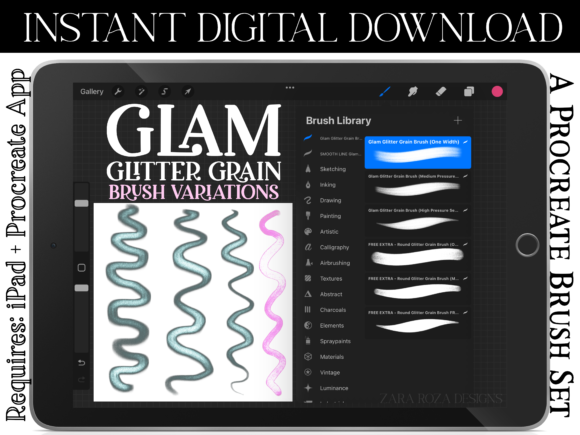
At its core, this digital download includes two .brushset files containing three primary variations of the Glam Glitter Grain Brush, along with three extra free variations. These tools are engineered to respond to the Apple Pencil’s pressure and opacity settings. This means that a light touch yields a subtle, dusty shimmer, while a firm press delivers a bold, saturated glow with visible grain.
For artists accustomed to charcoal, pastel, or gel pens, this transition feels intuitive. The "grain" aspect prevents the digital sheen from looking plastic or artificial. Instead, it mimics the way light catches on rough paper or how pigment settles into the tooth of a sketchbook. This realistic behavior is crucial for creating work that feels handcrafted, even when created on a glass screen.
Real-World Applications for Creators and Professionals
The versatility of the Glam Glitter Grain Brush extends across numerous industries and personal projects. Here is how different users can integrate these tools into their daily routines.
Social Media and Content Creation
In the crowded landscape of Instagram, YouTube, and Facebook, visual distinction is key. Graphic designers and influencers can use these brushes to create eye-catching thumbnails, story backgrounds, and post overlays. A simple text overlay on a photo can be elevated by adding a grainy, glittering underline or accent mark. For Valentine’s Day promotions, birthday announcements, or party invitations, the sweet and classy aesthetic of these brushes adds an immediate emotional hook without requiring complex illustration skills.
Digital Planning and Productivity
Digital planning has surged in popularity among students, teachers, and office professionals. Using an iPad for university notes or work schedules allows for flexibility, but it can often feel sterile. Incorporating the Glam Glitter Grain Brush into your GoodNotes or Notability workflow (via screenshots or direct Procreate integration) adds a layer of joy to the mundane. Imagine highlighting key study points with a subtle, retro-vintage shimmer rather than a neon yellow block. It makes reviewing notes for exams or preparing lesson plans less tedious and more visually engaging. The minimalist yet artsy vibe fits perfectly with the current trend of aesthetic productivity.
Illustration and Character Art
For illustrators working in kawaii, goth, boho, or punk rock styles, texture is vital for defining atmosphere. A gothic portrait might use the darker, grainier variations to add shadow and mystery, while a cute character design could utilize the lighter, sparkly strokes for accessories like bows or jewelry. The brush’s ability to handle both elegant and casual styles makes it a reliable choice for character artists who need to switch tones quickly. It is particularly effective for rendering fabrics like velvet or sequins, where light reflection and texture coexist.
Why Texture Matters in Digital Design
We live in a high-definition world, yet there is a growing nostalgia for the imperfect. The "glitch" aesthetic, vintage film grains, and hand-lettered fonts are popular because they feel human. The Glam Glitter Grain Brush taps into this desire for authenticity. When you use these brushes for hand lettering or calligraphy, the slight irregularity in the grain breaks up the monotony of digital lines. This is especially important for wedding invitations, branding logos, or packaging designs where a touch of elegance and classiness is required.
Moreover, using textured brushes helps hide the "digital perfection" that can sometimes make artwork look cold. By introducing noise and sparkle, you create a visual warmth that invites the viewer to look closer. This is beneficial for scrapbooking enthusiasts who want their digital layouts to resemble physical memory books. The grainy texture mimics the look of washi tape, sticker edges, or aged paper, making the digital experience feel nostalgic and comforting.
Considerations Before You Download
Before purchasing or downloading any digital asset, it is important to align it with your technical setup and creative goals. First, remember that this is an instant digital download. No physical item will be mailed to you. You must have the Procreate app installed on your iPad or iPad Pro to use these files. If you are an Android user or prefer Photoshop on desktop, this specific .brushset format will not work for you.
Second, consider your hardware. While the brushes are optimized for the Apple Pencil, the experience is best when your device supports pressure sensitivity. If you are using an older iPad model without full Pencil compatibility, you may not achieve the same dynamic range of opacity and size variation. However, the static textures will still function for background fills and decorative elements.
Finally, think about your aesthetic niche. While these brushes are versatile, they shine brightest in projects that benefit from a bit of flair—whether that is the sweet charm of kawaii art, the edgy vibe of punk rock zines, or the sophisticated touch of elegant stationery. If your work is strictly corporate, minimalist black-and-white line art, these might be used sparingly. But for anyone looking to add a pop of personality, they are invaluable.
Maximizing Your Creative Output
To get the most out of the Glam Glitter Grain Brush, experiment with layer blending modes. Try setting a glitter layer to "Screen" or "Add" to make the sparkles pop against dark backgrounds, or use "Multiply" for a more subdued, vintage ink effect. Combine the grainy pencil variations with smooth ink brushes to create contrast in your lettering. The interplay between rough and smooth textures creates visual interest that keeps viewers engaged.
For educators and students, these brushes can be used to create engaging presentation slides or flashcards. A history teacher might use a retro-vintage grain to highlight dates, while a literature student could use elegant swirls to annotate poetry. The key is consistency; once you find a combination of brushes that matches your personal brand or study style, stick with it to build a recognizable visual identity.
Ultimately, the Glam Glitter Grain Brush is more than just a tool; it is a catalyst for creativity. It encourages you to play, to doodle randomly, and to explore new aesthetics without the fear of wasting physical supplies. Whether you are designing a birthday card for a friend, planning your week, or creating professional social media content, this brushset offers the flexibility and flair needed to make your digital work stand out. Happy drawing!