20 Procreate Rose Stamps for Digital Art
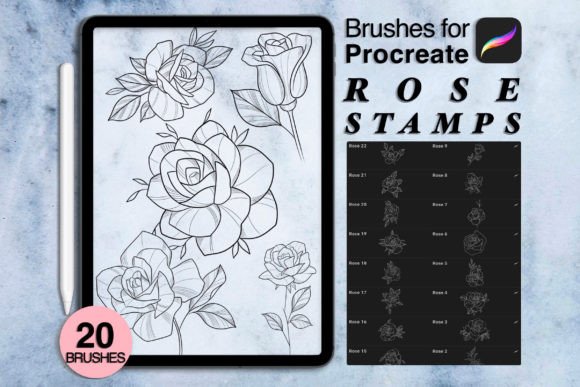
Digital illustration often demands a balance between technical precision and organic flow. When working on tight deadlines or seeking to elevate the aesthetic of a project, having reliable assets can transform your workflow. The 20 Procreate Rose Stamps collection offers exactly that: a curated set of floral elements designed to integrate seamlessly into your existing creative process. This is not merely about adding decoration; it is about enhancing composition, saving time, and maintaining a consistent visual language across your work.
For artists, designers, and content creators, the pressure to produce high-quality visuals consistently is real. Whether you are designing wedding invitations, creating social media graphics, or illustrating children’s books, hand-drawing every petal can be exhausting. These brushes provide a practical solution, allowing you to focus on layout, color theory, and storytelling rather than repetitive detailing. Available as an instant download, this toolset ensures you can begin creating immediately after purchase, with no physical shipping delays.
Enhancing Workflow Efficiency
The primary advantage of using specialized stamp brushes lies in efficiency. Traditional digital painting requires building up layers, adjusting opacity, and refining edges for each individual element. With these rose stamps, you place a fully formed, high-resolution floral element onto your canvas with a single tap. This does not mean sacrificing quality. Each stamp is crafted to retain the nuance of hand-drawn art, featuring varied line weights and organic shapes that avoid the sterile look of generic clipart.
Consider the process of creating a patterned background for a website or packaging design. Manually repeating a complex rose illustration would take hours. Using these stamps, you can scatter, rotate, and resize elements rapidly to build a cohesive texture. This speed allows for more experimentation. You can test five different compositions in the time it previously took to finalize one. For freelancers and small business owners, this efficiency translates directly into better time management and increased capacity for client work.
Creative Applications Across Industries
The versatility of floral assets extends far beyond simple decoration. Different professionals can adapt these stamps to meet specific industry standards and audience expectations.
- Wedding and Event Designers: Create elegant save-the-date cards, menu layouts, and seating charts. The romantic aesthetic of roses pairs perfectly with script fonts and soft pastel palettes. You can layer stamps to create borders or corner accents that frame text beautifully.
- Social Media Managers: Elevate Instagram stories and Pinterest pins by adding subtle floral overlays. A single rose stamp in the corner of a quote graphic can add sophistication without distracting from the message. It helps maintain brand consistency when used as a recurring visual motif.
- Educators and Publishers: Illustrate educational materials, storybooks, or worksheets. Flowers can serve as visual anchors for bullet points, chapter headers, or decorative dividers. The organic nature of the stamps makes learning materials feel more approachable and less rigid.
- Fashion and Textile Designers: Use the stamps as a base for textile prints. By varying the scale and color, you can generate unique fabric patterns for digital mockups before moving to production. This allows for rapid prototyping of seasonal collections.
Technical Requirements and Setup
To ensure optimal performance, it is essential to understand the technical environment required for these tools. The 20 Procreate Rose Stamps are designed specifically for the Procreate app on iPad. You will need an iPad Pro or any iPad model compatible with Procreate Version 5.0 or higher. An Apple Pencil or a third-party stylus that supports pressure sensitivity is recommended, although stamp brushes primarily rely on placement rather than pressure dynamics.
Upon purchase, you will receive a ZIP file containing the .brushes or .swatches files. It is important to note that no physical object will be shipped. After downloading, simply import the files into Procreate. The process is straightforward: open the brush library, swipe left on a folder to create a new one, and import the files. This immediate access means you can start integrating these assets into your current projects without waiting for delivery.
Please remember that photos, fonts, and mockups shown in promotional materials are for presentation purposes only and are not included in the download. This distinction is crucial for managing expectations and ensuring you have the necessary complementary assets for your final designs.
Achieving Originality with Pre-Made Assets
A common concern among creators is that using pre-made stamps might lead to generic-looking work. However, originality comes from how you manipulate and combine these elements. Here are several strategies to keep your results unique and audience-friendly:
- Custom Color Palettes: Do not rely on the default black or white. Sample colors from your project’s main image or brand guidelines. A rose in deep burgundy conveys a different mood than one in soft blush pink. Experiment with gradient maps to give the stamps a multi-tonal appearance.
- Layering and Opacity: Avoid placing stamps at 100% opacity. Lowering the opacity allows underlying textures or colors to show through, creating depth. Layer multiple stamps with slight rotations to build complex bouquets that look hand-composed rather than stamped.
- Mixing Media: Combine the rose stamps with hand-drawn sketches or watercolor backgrounds. The contrast between the precise digital stamp and loose, organic background elements creates visual interest and prevents the design from looking too uniform.
- Masking and Clipping: Use clipping masks to restrict the visibility of the stamps to specific shapes. For example, clip a rose pattern inside a text layer or a geometric shape. This technique integrates the floral elements into the structure of the design rather than just sitting on top.
Maintaining Consistency and Quality
When using these stamps across multiple projects or platforms, consistency is key to building a recognizable style. Establish a set of rules for how you use the roses. Will they always appear in the corners? Will they always be monochromatic? Defining these parameters helps maintain a cohesive brand identity.
Additionally, consider the resolution and output format. Since these are digital brushes, they scale well, but always check your canvas size before starting. For print projects, ensure your document is set to 300 DPI. For web use, 72 DPI is sufficient, but higher resolutions future-proof your assets for retina displays. Organize your Procreate layers logically, naming them clearly to facilitate easy edits later. This discipline is especially important when collaborating with clients or other designers who may need to adjust the file.
If you encounter any issues with the installation or have questions about specific use cases, reaching out to the creator, Gin, is encouraged. Clear communication ensures you get the most value from your purchase. Ultimately, the 20 Procreate Rose Stamps are a tool to empower your creativity, not replace it. They handle the repetitive details so you can focus on the big picture, resulting in work that is both beautiful and efficient.