Evaluating the Ariella Procreate Shadow Brush for Digital Lettering
Digital illustration and hand-lettering have evolved significantly with the advent of powerful tablet applications like Procreate. For artists seeking efficiency without sacrificing aesthetic quality, custom brushes serve as essential tools in their digital toolkit. Among these specialized assets, the Ariella Procreate Shadow Brush has garnered attention for its specific utility in adding depth and dimension to typography. This article provides an objective evaluation of this digital asset, exploring its functionality, installation process, and suitability for various creative workflows.
Understanding the Tool’s Core Functionality
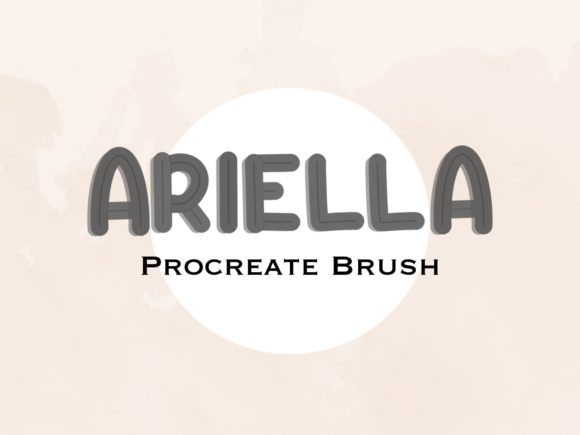
The Ariella Procreate Shadow Brush is a single-file digital download designed exclusively for use within the Procreate application on iPad. Unlike comprehensive brush packs that offer a wide variety of textures and strokes, this tool focuses on a singular purpose: creating consistent, aesthetically pleasing shadows for lettering designs. The primary value proposition lies in its ability to streamline a traditionally tedious process. Manually drawing drop shadows or using layer effects can sometimes result in rigid or unnatural looks. This custom brush aims to provide a more organic, hand-drawn appearance with minimal effort.
When evaluating this tool, it is important to recognize that it is not a standalone software but a modifier for an existing ecosystem. It requires the user to already possess an iPad compatible with Procreate. The file format is a .brushset, which ensures seamless integration into the app’s native brush library. This specificity means that while the learning curve is low, the utility is highly targeted toward users who frequently engage in typographic work, quote design, or illustrative lettering.
Benefits and Practical Advantages
For digital artists, time management is often as critical as creative output. The most significant benefit of the Ariella Procreate Shadow Brush is workflow efficiency. By automating the texture and shape of the shadow, artists can reduce the number of steps required to finalize a piece. Instead of adjusting multiple layer settings or manually tracing offset lines, users can apply the brush directly to achieve a cohesive look. This consistency is particularly valuable for creators producing content for social media, where maintaining a recognizable style across multiple posts is beneficial.
Furthermore, the brush offers a level of customization inherent to Procreate’s engine. While the brush itself provides the base structure, users can still adjust size, opacity, and color to match their specific project requirements. This flexibility allows the tool to adapt to both bold, modern typography and softer, whimsical scripts. The "easy method" described in the product details suggests that even beginners with limited experience in digital shading can achieve professional-looking results, lowering the barrier to entry for high-quality lettering design.
Installation and Technical Considerations
From a technical standpoint, the acquisition and setup process is straightforward, which is a positive factor for user experience. As a digital download, there are no shipping delays or physical components to manage. Users receive the .brushset file, which is typically stored in the iPad’s Files app under the Downloads section. Installation involves a simple tap action, which automatically imports the brush into Procreate. This ease of access reduces friction and allows artists to begin experimenting with the tool almost immediately after purchase.
However, potential buyers must be aware of the hardware limitations. The brush is strictly for use on iPad devices running Procreate. It is not compatible with Android tablets, desktop versions of Photoshop, or other illustration software. This exclusivity is a crucial consideration for artists who work across multiple platforms or who do not yet own an Apple tablet. Additionally, as a digital product, there is no physical item shipped, and refunds are generally subject to the seller’s specific policies regarding digital goods. Users should ensure their device compatibility before proceeding with the purchase.
Ideal Use Cases and Audience Fit
The Ariella Procreate Shadow Brush is best suited for specific types of creators. It is an excellent fit for:
- Social Media Content Creators: Individuals who need to produce visually engaging quotes or announcements quickly and consistently.
- Beginner Digital Artists: Those who struggle with manual shading techniques and want a reliable shortcut to improve the visual impact of their text.
- Professional Letterers: Established artists looking to speed up their workflow for client projects that require a specific shadow aesthetic.
In these scenarios, the tool acts as a force multiplier, allowing the artist to focus more on composition and message rather than technical execution of shadows. The resulting designs tend to have a polished, cohesive look that aligns well with current trends in digital stationery and printable art.
Limitations and When to Consider Alternatives
While the brush offers convenience, it is not a universal solution for all shading needs. Artists seeking highly realistic, photorealistic shadows based on complex light sources may find this tool limiting. The brush provides a stylized, artistic shadow rather than a physically accurate one. If a project requires precise lighting calculations or three-dimensional rendering, manual techniques or advanced layer styles might be more appropriate.
Additionally, users who prefer complete control over every aspect of their brush dynamics might find a pre-set brush restrictive. While adjustments are possible, the core behavior is predefined. Artists who enjoy building their own brushes from scratch or who require a vast library of varied textures might prefer investing in a larger, more diverse brush pack rather than a single-purpose tool. It is also worth noting that relying too heavily on preset tools can potentially stifle the development of fundamental shading skills if used exclusively by beginners.
Making an Informed Decision
Deciding whether to integrate the Ariella Procreate Shadow Brush into your workflow depends on your specific creative goals and current skill set. If you frequently create lettering designs in Procreate and find the process of adding shadows time-consuming or inconsistent, this tool offers a practical, cost-effective solution. It bridges the gap between amateur attempts and professional polish with minimal effort.
However, if your work involves complex illustrations requiring dynamic lighting, or if you do not use an iPad, this product will not meet your needs. It is also essential to respect the licensing terms: the brush is for personal and commercial use in your creations, but it cannot be resold, shared, or claimed as your own intellectual property. By understanding these boundaries and capabilities, artists can determine if this specialized tool aligns with their artistic vision and operational requirements.
Ultimately, the Ariella Procreate Shadow Brush represents a niche but valuable addition to the digital artist’s arsenal. It exemplifies how targeted digital tools can enhance productivity and aesthetic consistency, provided they are used within the right context and platform. For those committed to the Procreate ecosystem and focused on typography, it warrants serious consideration as a means to refine and accelerate their creative process.