Evaluating the Procreate Hair Brush Set Bundle Vol. 1 for Digital Portrait Artists
Digital illustration on the iPad has evolved into a sophisticated medium, particularly for portrait artists who require precise tools to render realistic textures. Among the myriad of assets available for the Procreate app, specialized brush sets play a critical role in workflow efficiency and artistic outcome. The Procreate Hair Brush Set Bundle Vol. 1 is one such resource designed specifically for rendering hair in digital portraits, character art, and illustrations. This article examines the features, updates, and practical applications of this bundle to help digital artists determine if it aligns with their creative needs.
Understanding the Toolset
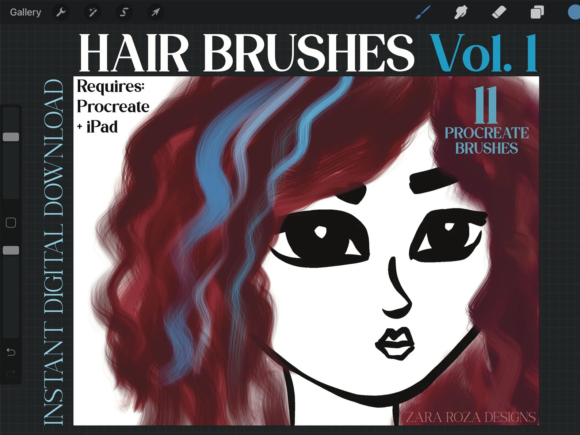
The core of this product is a single .brushset file compatible exclusively with the Procreate application on iPad devices, including the iPad Pro. Initially launched with 11 distinct brushes, the collection has undergone significant refinement. A notable update released on February 22, 2022, expanded the utility of the bundle by adding four extra free brushes, bringing the total count to 15. This expansion suggests a developer commitment to enhancing value and addressing user feedback regarding variety and versatility.
These brushes are engineered to simulate various hair styles and textures, ranging from fine strands to broader strokes suitable for blocking in shapes. The inclusion of a .swatches file indicates an attempt to provide a cohesive color starting point, although users should note that any accompanying JPG files are typically informational "thank you" cards rather than functional palette imports. Understanding this distinction helps manage expectations regarding what is included in the download package.
Technical Enhancements and Performance
One of the primary considerations for any digital brush is its response to input pressure and tilt. The latest iteration of the Procreate Hair Brush Set Collection Vol. 1 emphasizes enhanced flow effects. Specifically, the brushes have been tuned to fade out more naturally at the tips and when less pressure is applied with the Apple Pencil. This technical adjustment is crucial for painting hair from roots to tips, as it mimics the natural tapering of hair strands without requiring manual opacity adjustments for every stroke.
For artists using the Apple Pencil, this sensitivity translates to a more organic drawing experience. The ability to control density and opacity through pressure alone allows for faster iteration during the sketching and painting phases. However, it is important to recognize that these results are dependent on the hardware capabilities of the iPad. While the brushes are compatible with standard iPad models running Procreate, the nuance of pressure sensitivity is often best experienced on iPad Pro models equipped with the latest Apple Pencil technology.
Benefits for Portrait and Character Artists
The primary benefit of this bundle lies in its specialization. General-purpose round or flat brushes often require significant customization to achieve realistic hair textures. By using pre-configured brushes designed for this specific purpose, artists can reduce setup time and focus on composition and lighting. The variety within the 15-brush set allows for experimentation with different hair types, whether straight, wavy, curly, or coarse.
Furthermore, the bundle supports a range of artistic stages. It is suitable for initial sketching, where loose strokes define the volume and direction of hair, as well as for detailed rendering, where individual strands add realism. This versatility makes it a practical addition for graphic designers, illustrators, and concept artists who frequently work on face character art. The brushes facilitate a non-destructive workflow when used with Procreate’s layer blending modes, allowing for easy adjustments to color and tone.
Tradeoffs and Considerations
While specialized tools offer convenience, they also present certain tradeoffs. Relying heavily on texture brushes can sometimes lead to a uniform look across different artworks if the artist does not vary their technique. It is essential to view the Procreate Hair Brush Set Bundle Vol. 1 as a supplement to fundamental drawing skills rather than a replacement for them. Understanding anatomy, light sources, and color theory remains paramount; the brushes merely facilitate the execution of these concepts.
Another consideration is platform exclusivity. These brushes require the Procreate app and an iPad. Artists who work across multiple platforms, such as desktop-based software like Photoshop or Clip Studio Paint, will find these assets unusable outside the Apple ecosystem. Additionally, while the update added four brushes, some users seeking an extensive library of hundreds of textures might find the count of 15 limited. However, for many professionals, a smaller, high-quality set is often more manageable than an overwhelming archive of unused assets.
Ideal Use Cases
This bundle is a strong fit for several specific scenarios:
- Portrait Illustrators: Artists focusing on realistic or semi-realistic human faces will benefit from the nuanced flow control that mimics natural hair growth patterns.
- Character Designers: Those creating concept art for games or animation need quick ways to iterate on hairstyles. The varied textures in this set allow for rapid prototyping of character looks.
- Digital Painters: Users who prefer a painterly approach over line art will appreciate the brushes' ability to blend and fade, integrating hair seamlessly into the overall composition.
In these contexts, the enhanced flow effect and pressure sensitivity provide tangible workflow improvements, reducing the friction between artistic intent and digital execution.
When to Consider Alternatives
Despite its strengths, there are situations where alternative tools may be more appropriate. If an artist primarily works with vector graphics or clean, flat-color styles, textured hair brushes may be unnecessary. Similarly, beginners who are still mastering the basics of the Procreate interface might benefit more from learning to customize standard brushes before investing in specialized sets. This approach builds a deeper understanding of how brush engines work, enabling greater long-term flexibility.
Additionally, artists on a strict budget should evaluate whether the specific features of this bundle justify the cost compared to free community-made brushes or broader all-in-one brush packs. While the Procreate Hair Brush Set Bundle Vol. 1 offers targeted quality, generalist packs may provide better value for those who need diverse tools for backgrounds, clothing, and environments alongside hair.
Making an Informed Decision
Selecting the right digital tools requires an honest assessment of one’s current workflow and artistic goals. The Procreate Hair Brush Set Bundle Vol. 1 offers a focused solution for a common challenge in digital portraiture: rendering convincing hair. Its recent updates demonstrate responsiveness to user needs, particularly regarding flow and pressure dynamics. For iPad-based artists who prioritize efficiency and realism in character art, this bundle represents a logical investment.
However, potential buyers should ensure they are committed to the Procreate ecosystem and possess the foundational skills to leverage these specialized tools effectively. By viewing the brushes as part of a broader toolkit rather than a standalone solution, artists can integrate them seamlessly into their practice, enhancing both the speed and quality of their digital illustrations.