Procreate Coloured Pencil Sunflowers Guide
Digital art has evolved significantly, moving far beyond flat vectors and sterile gradients. Today, creators crave texture, imperfection, and the tactile warmth of traditional media. This is where Procreate Coloured Pencil Sunflowers steps in as a transformative tool for iPad artists. Whether you are illustrating botanical prints for a lifestyle brand or sketching quick concepts for a client presentation, these hand-created digital brushes bridge the gap between analog charm and digital convenience.
The appeal of sunflower imagery lies in its versatility. It represents warmth, growth, and natural beauty, making it a perennial favorite in design. However, rendering realistic petals and textured centers using standard digital tools can be time-consuming. A specialized brush pack designed specifically for this subject matter streamlines the workflow while enhancing the aesthetic quality of the final piece.
Understanding the Toolkit
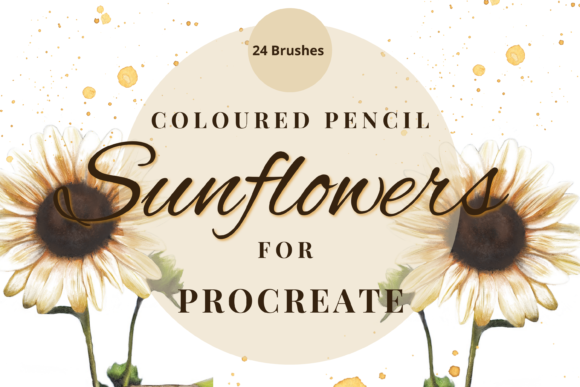
This specific brush pack is not just a single tool but a comprehensive suite comprising 24 unique individual brushes. To get the most out of Procreate Coloured Pencil Sunflowers, it is essential to understand how these components interact. The collection includes sketch-style stamps, paper textures, and dedicated coloured pencil brushes.
The coloured pencil brushes are engineered to mimic the behavior of real wax-based pencils. They can be used to "paint" solid areas of color or blended softly to create smooth transitions. This dual functionality allows artists to switch between detailed line work and broad shading without changing tools constantly. The sketch stamps serve as excellent starting points. Instead of drawing every petal from scratch, you can place a stamp and use it as a guide, refining the shapes to suit your composition. This feature is particularly valuable for professionals working under tight deadlines who need to maintain high output without sacrificing quality.
Mastering Texture and Layering
One of the most critical aspects of achieving a realistic look is the integration of paper texture. Digital canvases are inherently smooth, which can make artwork feel cold or artificial. The paper texture brushes included in this pack add that necessary grain. A pro tip for maximizing this effect is to use blend modes effectively. When applying a paper texture, try setting the layer mode to Multiply. This allows the texture to interact with the colors beneath it, creating depth and visual interest that mimics traditional paper.
Furthermore, the strength of the blend and ink charge can be altered dynamically. By adjusting the opacity slider or experimenting with different blend modes, you can control how heavily the pigment lays down. This level of control is crucial for creating dimension in sunflower centers, which require a complex interplay of light and shadow. You might start with a low opacity to build up layers gradually, ensuring that the final image retains a soft, organic feel rather than looking digitally saturated.
Practical Applications for Creators
The utility of Procreate Coloured Pencil Sunflowers extends across various industries and creative pursuits. For entrepreneurs and marketers, these brushes offer a way to create distinctive branding materials. Hand-drawn elements stand out in a sea of stock photography. Imagine using these textured sunflowers on packaging for organic skincare products, wedding invitations, or social media graphics. The artisanal look communicates authenticity and care, values that resonate deeply with modern consumers.
Educators and bloggers can also benefit significantly. Illustrations created with these brushes can make educational content more engaging. A biology teacher might use them to create visually appealing diagrams of plant anatomy, while a lifestyle blogger could use them to decorate recipe cards or journal entries. The ability to resize brushes using the move and resize tool in Procreate ensures that these elements can be adapted for anything from a small icon to a large poster print.
For freelance illustrators, this pack enhances efficiency. The stamps act as building blocks, allowing for rapid prototyping of compositions. You can mix and match elements across various projects, ensuring consistency in style while varying the subject matter. This modularity is a key advantage in commercial illustration, where clients often request multiple variations of a theme.
Technical Requirements and Setup
Before diving into creation, it is vital to address the technical prerequisites. These files are digital brushes designed exclusively for the Procreate app. They will not function in other software like Photoshop or Clip Studio Paint. To use them effectively, you need an iPad compatible with Procreate and an Apple Pencil. The pressure sensitivity of the Apple Pencil is crucial for replicating the nuanced strokes of a real colored pencil.
Installation requires a few simple steps. First, ensure you have a platform to download the files, such as iCloud or Google Drive. Since the brush pack is likely compressed, you will need a program like iZip to unzip the files on your iPad. Once unzipped, you can import the brushes directly into Procreate. It is advisable to organize them into a new brush set within the app to keep your workspace tidy and accessible.
Tips for Optimal Results
- Experiment with Opacity: Do not rely on full opacity. Lowering the opacity allows for subtle layering, which is key to achieving the translucent quality of colored pencils.
- Use Stamps as Guides: Place a sunflower stamp on a separate layer and lower its opacity. Use this as an underlay to trace over with your pencil brushes, ensuring accurate proportions while adding your unique artistic flair.
- Combine Textures: Don’t limit yourself to one texture brush. Try overlaying different paper grains to create a more complex and realistic surface.
- Resize Strategically: Use the brush resize tool for quick adjustments during drawing, but use the move and resize tool for precise placement of stamped elements.
In conclusion, Procreate Coloured Pencil Sunflowers offers a robust solution for artists seeking to infuse their digital work with traditional warmth. By understanding the tools, mastering layering techniques, and applying them to real-world projects, creators can elevate their visual communication. Whether for personal enjoyment or commercial gain, this brush pack provides the flexibility and quality needed to produce stunning, textured artwork efficiently.