Procreate Shape Stamp Brush Set 1: Streamlining Your Digital Design Workflow
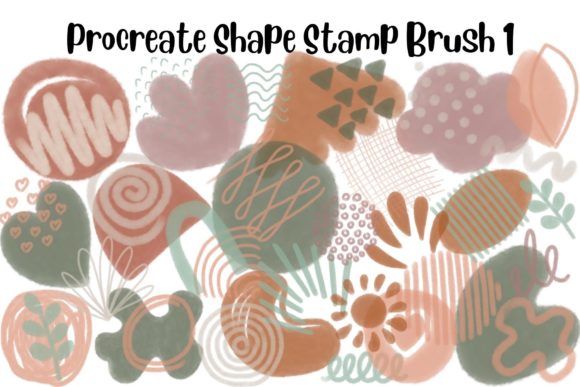
If you have ever spent hours trying to draw a perfect geometric border or struggled to keep your doodles consistent across a digital planner page, you understand the friction that can slow down creative momentum. The Procreate Shape Stamp Brush Set 1 addresses this common pain point by offering a library of 64 pre-designed stroke stamps that integrate seamlessly into your existing workflow. This is not just about adding decoration; it is about reclaiming time and maintaining visual consistency in your projects.
This brush set is designed specifically for the Procreate app on iPad, requiring version 5.0 or higher. It comes as a single .brushset file, making installation straightforward. Once loaded, these tools allow you to stamp shapes instantly, adjust their color and opacity, and resize them to fit your composition. However, the true value lies in how these simple tools adapt to various professional and personal contexts.
Accelerating Digital Planning and Journaling
Digital planning has exploded in popularity among students, professionals, and hobbyists who want the flexibility of digital notes with the aesthetic appeal of hand-written journals. One of the most time-consuming aspects of digital planning is creating consistent layouts. Drawing boxes, bullet points, and decorative dividers manually can break your flow when you are trying to capture ideas quickly.
With the Procreate Shape Stamp Brush Set 1, you can populate your weekly spreads with uniform icons and borders in seconds. Imagine you are setting up a habit tracker. Instead of drawing thirty small circles or squares by hand, you simply select the appropriate shape from the stamp set, tap it onto the canvas, and duplicate it as needed. This ensures that every checkbox is identical in size and style, giving your planner a polished, professional look without the tedious effort.
Furthermore, because you can adjust the opacity, these stamps are excellent for creating subtle background elements. You can place a faint geometric pattern behind your text blocks to add depth without distracting from your handwritten notes. This level of customization helps users create unique templates that stand out in crowded online marketplaces or serve as highly functional personal organizers.
Enhancing Sticker Design and Small Business Products
For entrepreneurs running small businesses on platforms like Etsy, speed and consistency are directly tied to profitability. Creating digital stickers or designs for print-on-demand products like mugs and shirts often involves repetitive elements. A sticker sheet might require dozens of similar frames or accent marks. Manually drawing each one introduces slight variations that can look unprofessional if not executed with extreme precision.
Using this stamp set allows creators to maintain brand consistency. If your brand relies on a specific style of doodle or border, having these shapes as stamps ensures that every product you release shares a cohesive visual language. You can stamp a shape, change its color to match your current product palette, and resize it to fit different dimensions—whether it is a small sticker for a laptop or a large graphic for a tote bag.
Consider a scenario where you are designing a set of motivational quote stickers. You can use the shape stamps to create varied frames around each quote. By mixing and matching different stamps from the 64 available options, you can produce a diverse collection that still feels like part of a unified series. This efficiency enables small business owners to release new collections more frequently, keeping their shops fresh and engaging for customers.
Simplifying Educational Content and Social Media Graphics
Educators and content creators often need to produce visual aids quickly. Whether you are designing worksheets for students, creating infographics for social media, or illustrating blog posts, having a toolkit of ready-made shapes is invaluable. Teachers can use these stamps to highlight key information, create boundaries for student responses, or add playful elements to make learning materials more engaging.
For social media managers and bloggers, visual consistency is crucial for brand recognition. When creating carousel posts or story highlights, using consistent graphical elements helps tie different pieces of content together. The Procreate Shape Stamp Brush Set 1 provides a quick way to add visual interest to text-heavy graphics. You can use the stamps to create bullet points, separate sections, or frame important quotes. Because the brushes work with any color, you can easily adapt them to match your brand guidelines or the specific theme of a campaign.
The ability to resize and rotate these stamps means you are not limited to their original orientation. You can stretch a border to fit a wide banner or shrink an icon to serve as a subtle accent. This flexibility makes the set useful for a wide range of aspect ratios, from square Instagram posts to vertical Pinterest pins.
Technical Considerations and Best Practices
Before integrating this tool into your workflow, it is essential to understand its technical limitations and requirements. The Procreate Shape Stamp Brush Set 1 is exclusive to the Procreate app on iPad. It will not function in Photoshop, Procreate Pocket, or any other design software. This specificity is important for users who work across multiple platforms; you will need to complete your stamping work within Procreate before exporting your files for use elsewhere.
To get the most out of these brushes, ensure your Procreate app is updated to version 5.0 or higher. Older versions may not support the brush engine features used in this set. Once installed, remember that these are stamp brushes, not drawing brushes. They are designed to be tapped onto the canvas rather than dragged. Dragging may result in unintended repetitions or distortions.
Experimentation is key to unlocking the potential of these 64 stamps. Try layering different shapes to create complex designs. For example, you can stamp a circle and then overlay a smaller star to create a custom badge. Adjusting the opacity can also create interesting effects, such as watermarks or background textures. Since the brushes are vector-like in their scalability within Procreate, you can resize them significantly without losing quality, provided you are working at a high enough canvas resolution.
Making the Right Choice for Your Creative Needs
When deciding whether to add this set to your library, consider your current bottlenecks. If you find yourself repeatedly drawing the same shapes or struggling with layout consistency, this tool offers a practical solution. It is particularly beneficial for those who value efficiency and clean aesthetics. However, if your style relies heavily on organic, imperfect hand-drawn lines, you might use these stamps more sparingly, perhaps as underlying structures rather than final visible elements.
Ultimately, the Procreate Shape Stamp Brush Set 1 is about removing friction from the creative process. It allows you to focus on the bigger picture of your design while handling the repetitive details with ease. Whether you are a seasoned designer looking to speed up your workflow or a beginner wanting to achieve professional-looking results with minimal effort, these 64 stamps provide a versatile foundation for a wide array of digital projects. By integrating these tools thoughtfully, you can enhance both the quality and quantity of your creative output.