Streamlining Character Design with the Kawaii Portrait Creator Procreate Brush Set
In the fast-paced world of digital illustration, consistency and speed are often at odds with creativity. For professionals, entrepreneurs, and hobbyists alike, the pressure to produce high-quality character art for social media, client projects, or personal brands can lead to creative burnout. This is where specialized tools like the Kawaii Portrait Creator Procreate Brush set become essential assets rather than mere shortcuts. By integrating a structured library of guides, poses, and features into your workflow, you transform the daunting task of drawing from scratch into a manageable, efficient process that maintains artistic integrity while significantly reducing production time.
The concept behind this toolset is not to replace skill, but to augment it. Whether you are a marketer designing avatars for a campaign, an educator creating engaging visual aids, or a freelancer managing multiple client deadlines, understanding how to leverage pre-made assets effectively is a critical professional skill. The Kawaii portrait creator procreate brushes serve as a foundational framework, allowing artists to focus on expression, color theory, and composition rather than getting bogged down in repetitive anatomical structures.
Understanding the Toolkit Components
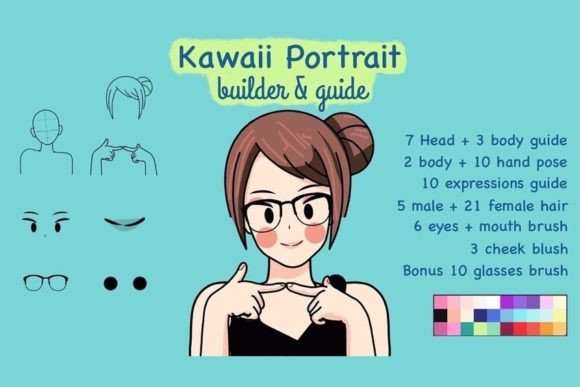
To maximize efficiency, one must first understand the architecture of the tool. This specific bundle is designed with modularity in mind, breaking down the complex human form into manageable layers. The package includes seven head guide brushes and three body guide brushes, which act as the skeletal structure for your portraits. These guides ensure that proportions remain consistent across different characters, a common pain point for artists who struggle with perspective and scale.
Beyond the structural basics, the set offers extensive customization options. With nine hand pose brushes, five male hair brushes, and twenty-one female hair brushes, the variety allows for distinct character identities without starting from zero. Additionally, ten expression guide brushes, six eye and mouth brushes, and three cheek blush brushes provide the emotional depth necessary for engaging kawaii art. The inclusion of ten bonus glasses brushes and a curated color palette further streamlines the finishing touches, ensuring that accessories and tones harmonize with the overall aesthetic.
Integrating Brushes into Your Creative Workflow
Implementing the Kawaii Portrait Creator Procreate Brush into your daily routine requires a shift in mindset from "drawing everything" to "assembling and refining." Here is how this tool fits into various stages of a project lifecycle:
Pre-Production and Planning
Before you even open Procreate, consider the narrative or brand identity you wish to convey. Are you creating a series of characters for a children’s book? Or perhaps diverse avatars for a corporate team page? Use the head and body guides to sketch out rough thumbnails. Because the guides are standardized, you can rapidly iterate through different body types and angles. This phase is crucial for maintaining consistency across a series. By using the same underlying structure, you ensure that all characters feel like they belong to the same universe, which is vital for brand recognition and professional polish.
Execution and Assembly
During the creation phase, layer management becomes your best friend. Start with the head guide on a lower opacity layer. On separate layers above, begin adding the hair, eyes, and mouth. The beauty of using specific brushes for these elements is the ability to mix and match. For instance, you might pair a serious expression guide with playful eyes to create a nuanced character. The nine hand pose brushes allow you to add dynamic gestures without struggling with complex finger anatomy, a frequent bottleneck for many illustrators. This modular approach means you can build a library of reusable components, saving hours on future projects.
Refinement and Quality Control
Once the basic elements are assembled, the real artistry begins. Use the cheek blush brushes and color palette to add warmth and life to the portrait. This is where you differentiate your work from generic clip art. Adjust the hue and saturation to match your specific lighting conditions. The included glasses brushes can be customized with different tints and reflections to add realism. Always review your work against the initial brief. Does the character convey the intended emotion? Is the style consistent with previous outputs? The structured nature of the Kawaii portrait creator procreate brushes makes this quality control step easier, as deviations from the norm are immediately apparent.
Compatibility and Technical Considerations
This toolset is exclusively designed for Procreate, leveraging the app’s unique brush engine and layer capabilities. To ensure smooth performance, keep your Procreate software updated to the latest version. Older versions may not support certain brush dynamics or texture settings, leading to unexpected results. Furthermore, organize your brush library within Procreate by creating a dedicated group for these assets. This prevents clutter and allows for quick access during intense work sessions. For users working on iPads with smaller screens, consider using the split-view feature to reference the color palette or guide sheets simultaneously while drawing.
It is also important to note that while these brushes accelerate the process, they do not eliminate the need for fundamental artistic knowledge. Understanding light, shadow, and color theory will help you integrate these assets seamlessly into your artwork. The brushes provide the shape, but you provide the soul. Experiment with blending modes and opacity settings to make the stamped elements feel painted rather than pasted. This attention to detail is what separates amateur implementations from professional-grade illustrations.
Practical Use Cases for Professionals and Hobbyists
The versatility of this brush set extends beyond simple character portraits. Here are several practical applications where this tool adds significant value:
- Content Creation: Social media managers can create consistent avatar sets for Instagram stories or TikTok profiles, enhancing brand identity without hiring a full-time illustrator.
- Educational Materials: Teachers and instructional designers can quickly generate diverse characters for worksheets, presentations, and e-learning modules, making content more engaging for students.
- Freelance Projects: Freelancers can reduce turnaround time for client requests, allowing them to take on more projects or charge premium rates for faster delivery.
- Personal Branding: Entrepreneurs can design unique merchandise, such as stickers, prints, or digital goods, with a cohesive kawaii aesthetic that appeals to niche markets.
For educators and bloggers, the ability to produce custom visuals quickly means you are less reliant on stock photography, which often lacks personality and specificity. By creating your own assets, you maintain full copyright ownership and avoid licensing issues. This autonomy is particularly valuable for small business owners who need to protect their intellectual property while building a recognizable visual language.
Long-Term Value and Skill Development
Investing in tools like the Kawaii Portrait Creator Procreate Brush is not just about immediate convenience; it is about long-term workflow optimization. As you become familiar with the components, you will develop a mental library of combinations that work well together. This intuition speeds up decision-making and reduces creative fatigue. Moreover, studying the construction of these brushes can teach you about proportion and design principles. You may find yourself adapting techniques from the guide brushes to your freehand work, ultimately improving your overall artistic skill set.
Consistency is key in building a portfolio or brand. By using a unified set of tools, you ensure that your output remains coherent over time. This reliability builds trust with your audience or clients, who come to expect a certain level of quality and style from your work. In a saturated digital market, having a distinct, consistent visual identity is a competitive advantage that these brushes help you achieve efficiently.
In conclusion, the Kawaii portrait creator procreate brushes are more than just a collection of stamps; they are a strategic resource for anyone looking to streamline their digital art process. By understanding how to integrate these tools into your planning, execution, and refinement phases, you can achieve higher productivity without sacrificing creativity. Whether you are a seasoned professional or a passionate hobbyist, mastering this toolkit will empower you to create beautiful, consistent, and engaging kawaii portraits with confidence and ease.